APEX: Make REST Request via PL/SQL
OCI Cloud Announcements

About this Post
Today's post will be short and sweet and along the lines of APEX & Oracle Cloud Infrastructure (OCI) integrations using the OCI REST APIs.
In a recent customer engagement, the were seeking to expand the integrations that they had with OCI. Several dashboards were being developed to allow consumers a view into the OCI tenancy on an OCI Dedicated Region - Cloud@Customer (DRCC) without the need to over-provision users and build out complex compartment policies.
In recent weeks they had system outages reported by end users, all of which were posted announcements, say scheduled maintenance or action required. The service owners either did not pass notify the service users or did not check the announcements on a regular basis.
The dashboard would be enhanced with a feature to collect and display the announcement with the affected resources and region details and notify the owner with the description of the announcement.
Although the team had pre-existing OCI service integrations via REST, the had been unsuccessful in consuming the Announcements Service API.
Let's Get Right Into It
Ironically the Announcements Service API is a fairly simply one, compared to the other integrations they built previously.
Testing an service API is always recommended before going full throttle into application design and development and Oracle APEX provides several ways to validate connectivity, invocation and response inspection. Certainly tools such as Postman are available but I'm in the APEX and Database world and at Oracle.
API usage
A complete description of OCI's Cloud Announcement service can be found here. It also includes a section on the required IAM policies and depending on the user's access you can either see only the summary version of any given announcement or you can also view announcement details.
The announcement service has two APIs that will called to get the announcement details and they affected resources:
ListAnnouncements - to get a list of announcements for the current tenancy
GetAnnouncement - to get the details of a specific announcement
The sequence of calls should be clear but just in case, first I will test getting a list of announcements and then get the details of the specific announcement as this is where the information about the affected resource can be retrieved.
Let's Write Some Code
There are many examples on using the APEX Web Service's MAKE_REST_REQUEST Function, and this example is no different.
An APEX Web Credential is required to run this code based on the API key for the OCI user. This can be created using the APEX_CREDENTIAL package CREATE_CREDENTIAL Procedure but it is far simpler to use the web interface to Create Web Credentials.
Start with the declaration of variables
DECLARE
    l_request_url               varchar2(32767);     -- the base url
    l_announcements_response    clob;                -- json response from list announcements
    l_announcement_response        clob;                -- json response from get announcement
    v_compartmentId             varchar2(200);       -- the OCID of the root compartment
Setting up the variables and making our first REST call
BEGIN
    -- Use the value of the root compartment of your tenancy
    v_compartmentId := 'ocid1.tenancy.oc1........';

    -- Use the API Endpoint for your region
    -- https://docs.oracle.com/en-us/iaas/api/#/en/announcements/0.0.1/
    l_request_url := 'https://announcements.eu-frankfurt-1.oraclecloud.com/20180904/announcements';

    -- The parameters for the API can be passed as query parameters
    -- appended to the request url
    -- l_request_url || '?compartmentId=' || v_compartmentId;
    --
    -- or passed as a name/value pair as shown below
    l_announcements_response := apex_web_service.make_rest_request(
        p_url => l_request_url,
        p_http_method => 'GET',
        p_credential_static_id => 'sydney_datamgmt',
        p_parm_name => apex_string.string_to_table('compartmentId'),
        p_parm_value => apex_string.string_to_table(v_compartmentId)
    );

    dbms_output.put_line(apex_web_service.g_status_code);
END;
We could "END;" here if the status code returned is "200" but I'd like to see the response data and use it to view the announcement detail.
The typical REST response will be a JSON document, which I will parse using the SQL/JSON Function JSON_TABLE
After printing out the response status code, replace the closing "END;" with the next following code snippet, if you are following along.
    -- Setup a for loop with a query on our response variable
    for summaries in (select id,type,summary,announcementType
        from json_table(
        l_announcements_response, '$.items[*]'
        null on empty
        columns (
            id                  varchar2(400) path '$.id',
            type                varchar2(400) path '$.type',
            summary             varchar2(400) path '$.summary',
            announcementType             varchar2(400) path '$.announcementType'
        )
    ))
    loop
        begin
            -- Print out all ids, types and summaries of the announcements
            dbms_output.put_line('Announcement -> ' || summaries.id || ': ' || summaries.announcementType || ' ' || summaries.summary);
        end;
    end loop;
END;
The output should be similar to this

Let's finish the test, enhancing the loop to get the announcement details only when an action is required or there will be scheduled maintenance.
Replace the code from the loop to the end
    loop
        begin
            case
                -- When action is required or it is a scheduled maintenance announcement
                -- Get the announcement detail
                when summaries.announcementType in ('ACTION_REQUIRED', 'SCHEDULED_MAINTENANCE') then
                    begin
                        l_announcement_response := apex_web_service.make_rest_request(
                        p_url => l_request_url || '/' || summaries.id,
                        p_http_method => 'GET',
                        p_credential_static_id => 'sydney_datamgmt'
                        );

                        dbms_output.put_line(chr(10) || 'Announcement -> ' || summaries.id || ': ' || summaries.announcementType || ' ' || summaries.summary);
                        if (l_announcement_response is not null) then
                            begin
                                dbms_output.put_line(chr(10) || json_value(l_announcement_response, '$.services[*]'));

                                begin
                                    for resources in (select resourceId, resourceName, region
                                        from json_table(
                                            l_announcement_response, '$.affectedResources[*]'
                                            null on empty
                                            columns (
                                                resourceId      varchar2(400) path '$.resourceId',
                                                resourceName    varchar2(400) path '$.resourceName',
                                                region          varchar2(400) path '$.region'
                                            )
                                        ))
                                    loop
                                        begin
                                            dbms_output.put_line('Resource: ' || resources.resourceName || ', id: ' || resources.resourceId || ' in ' || resources.region || ' region.' || chr(10));
                                        end;
                                    end loop;

                                    exception
                                        when no_data_found then
                                            dbms_output.put_line('Oops, something went wrong!');
                                end;
                            end;
                        end if;
                    end;
                else
                    null;
            end case;
        end;
    end loop;
END;
Enhanced output
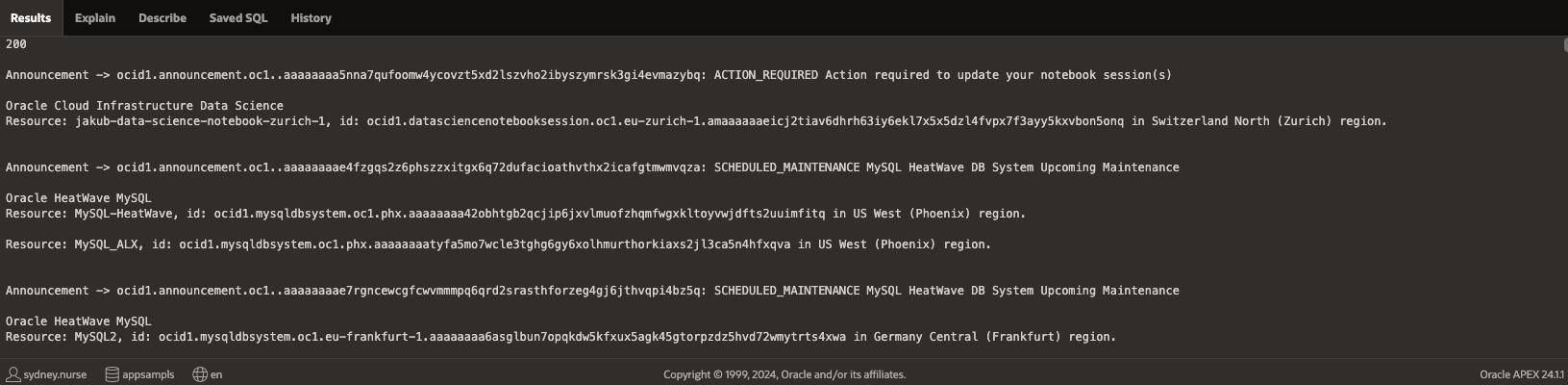
The AnnouncementsCollection's AnnouncementSummary and the Announcement references do include other attributes, that have been ignored.
Conclusion
The ability to test service integrations before building an application is important time saver.
In this small example, you can quickly validate user access, policies, parse and review the API responses which can be used as a test framework for other OCI services.
It also demonstrates that additional tools are not required, which often integrate slightly differently than the Oracle Database and APEX.
About the author
I work with software but it does not define me and my constant is change and I live a life of evolution. Learning, adapting, forgetting, re-learning, repeating I am not a Developer, I simply use software tools to solve interesting challenges and implement different use cases.
Comments
Join the discussionNo comments yet. Be the first to comment.
APEX OCI Rest Integration
A series of articles related to integrating APEX with OCI Services over REST. The set of services are Infrastructure or platform related. Oracle SaaS and Fusion services will be in the APEX for Fusion Extension series.